Part of ZenUML for Confluence · For equipment, engineering software and infrastructure teams
Keep Your System Diagrams Where Your Engineering Knowledge Lives
Put draw.io, Mermaid, PlantUML and sequence diagrams on the same Confluence page as your specs, test notes and runbooks. Your team edits diagrams in Confluence and finds them with Confluence search, so nobody exports an image from another tool and uploads it again.
Install Free — Lite Plan · See the example diagrams
✓ draw.io, Mermaid, PlantUML, sequence and OpenAPI in one app ✓ Diagrams stored in your Confluence site ✓ Edited where your team already writes
Built for systems that outlive their documents
Equipment and infrastructure stay in service for decades. Controllers get new firmware, sensors get replaced, and the people who designed the system move on. The diagram that explains how it all fits together is often a PNG on someone's drive, older than the system it describes.
ZenUML keeps that diagram on a Confluence page, next to the text that explains it. When the design changes, anyone with edit rights updates the diagram in place, and Confluence keeps every previous save.
For equipment and engineering software teams
Map how your machine talks to the world
Draw the controllers, buses, safety circuits, gateways and cloud services of a machine with the full draw.io editor, directly on a Confluence page.
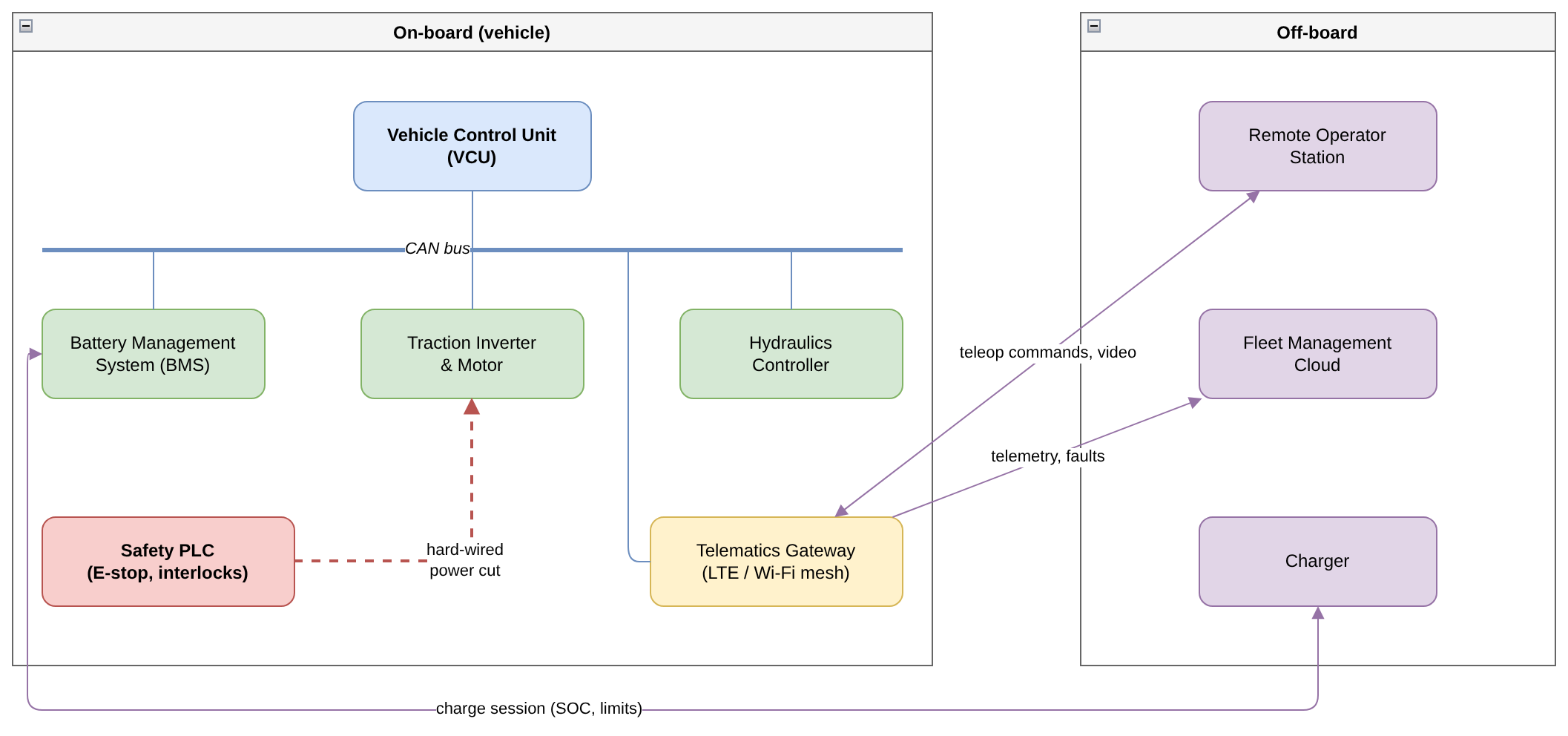
Example: system architecture of a battery-electric underground loader, drawn in draw.io.
Write control logic as text
Operating modes, fault handling and interlocks have many branches. With Mermaid you describe a state machine in a few lines of text, and changing the logic means editing a line instead of redrawing arrows.
stateDiagram-v2
    [*] --> Standby: Key on, self-test passed
    Standby --> Operating: Interlocks closed
    Operating --> Standby: Park brake applied

    state Operating {
        [*] --> Manual
        Manual --> Remote: Hand over to remote station
        Remote --> Manual: Cab takeover
        Remote --> SafeStop: Remote link lost
    }

    Operating --> EmergencyStop: E-stop or critical fault
    SafeStop --> Standby: Link restored
    EmergencyStop --> Standby: Reset + supervisor ack
    Standby --> Charging: Charger connected
    Charging --> Standby: Charge complete
The exact source above, rendered live in your browser by Mermaid.js — the same library the ZenUML macro uses.
Show the order of messages when it matters
When the order of messages between a controller, a gateway and a platform is the hard part, use a sequence diagram in ZenUML or PlantUML. API contracts can sit beside them as OpenAPI documents.
Let your AI agent read and update the diagrams
The ZenUML MCP server lets Claude Code, Codex, Cursor and other MCP clients find, read, create and update your diagrams in Confluence. The agent signs in as you and reaches only the pages your Confluence permissions allow.
For infrastructure operations teams
Find the alarm path when you need it
Document how a reading travels from a field sensor through a gateway and SCADA to the on-call engineer, including what happens when the uplink is down. Keep the diagram on the runbook page where the team looks during an incident.
title Pressure Alarm: Sensor to On-Call Engineer
@Boundary Sensor
@Control Gateway
@Entity SCADA
@Control Alerts
@Actor OnCall

// Field sensor reports every 5 s
Sensor->Gateway.report(pressure) {
  if(uplinkAvailable) {
    Gateway->SCADA.push(reading) {
      if(pressure > threshold) {
        SCADA->Alerts.raise(alarm) {
          Alerts->OnCall.page(alarm)
          if(noAckIn15Min) {
            Alerts->OnCall.escalate(alarm)
          }
        }
      }
    }
  } else {
    // Uplink down: buffer locally, apply local safety rule
    Gateway->Gateway.buffer(reading)
    if(pressure > tripLimit) {
      Gateway->Sensor.tripValve()
    }
  }
}

// When the uplink returns
Gateway->SCADA.replay(buffered)
Hand over systems without losing the design
When a project moves from construction to operations, the system diagrams move with the Confluence space. They stay searchable, and every saved version is kept.
For project and engineering management
Make the approval workflow visible
Draw design-change, inspection and handover workflows as draw.io swimlanes, so the contractor, designer, supervising engineer and owner can all see who does what.
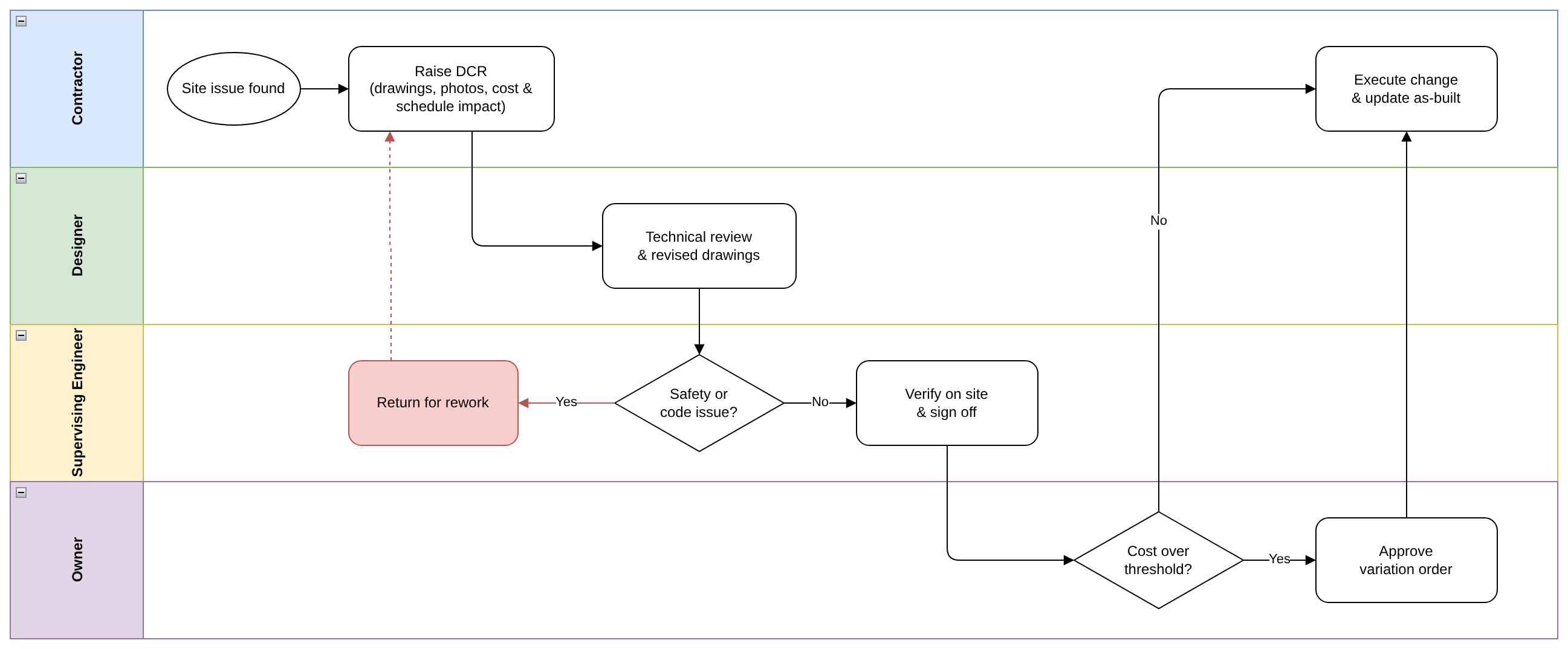
Example: design change request approval across four parties, drawn in draw.io.
Keep the schedule next to the plan
Write a construction or commissioning schedule as a Mermaid Gantt chart and keep it on the project page.
gantt
    title Pump Station Upgrade - Construction Schedule
    dateFormat YYYY-MM-DD
    axisFormat %b %d
    excludes weekends

    section Design & Permits
    Detailed design            :done,    des, 2027-01-04, 20d
    Permit approval            :done,    per, after des, 15d

    section Civil Works
    Site preparation           :active,  site, after per, 10d
    Excavation & shoring       :         exc, after site, 12d
    Foundation pour            :         fnd, after exc, 8d
    Concrete curing            :         cure, after fnd, 14d

    section Mechanical & Electrical
    Pump & pipework install    :         mech, after cure, 15d
    Electrical & control panel :         elec, after cure, 18d
    SCADA integration          :         scada, after elec, 8d

    section Handover
    Commissioning tests        :crit,    com, after mech scada, 7d
    Handover to operations     :milestone, ho, after com, 0d
The exact source above, rendered live in your browser by Mermaid.js.
Example diagrams
Every example on this page is a working diagram. Copy the Mermaid or ZenUML source into a ZenUML macro and it renders on your Confluence page. The systems, names and numbers are illustrative.
| Example | Diagram type | Who it is for |
|---|---|---|
| Battery-electric loader system architecture | draw.io | Equipment and engineering software teams |
| Equipment operating modes | Mermaid state diagram | Equipment and engineering software teams |
| Pressure alarm, sensor to on-call engineer | ZenUML sequence diagram | Infrastructure operations |
| Design change request approval | draw.io swimlanes | Project and engineering management |
| Pump station upgrade schedule | Mermaid Gantt chart | Project and engineering management |
One app, every diagram type your team uses
| You need to show | Use |
|---|---|
| System and equipment architecture | draw.io |
| State machines, flowcharts, schedules | Mermaid |
| Message order between components | ZenUML sequence diagrams or PlantUML |
| API contracts | OpenAPI |
Frequently asked questions
Does ZenUML replace our CAD, BIM or SCADA software?
No. ZenUML is for the diagrams that explain your systems and processes: architecture, control logic, data flow and workflows. Drawings, models and live plant data stay in your engineering tools.
Where are the diagrams stored?
Diagrams are stored as Confluence custom content in your Atlassian site. Sequence, Mermaid, draw.io and OpenAPI diagrams render in the reader's browser. PlantUML is the exception: its source is sent to the public plantuml.com service to produce the image.
Can external partners see the diagrams?
Anyone who can view the Confluence page can view its diagrams, including guests your Confluence admin has invited to a space.
Can we bring in existing draw.io files?
Yes. ZenUML stores draw.io diagrams as draw.io XML, the same format as .drawio files from diagrams.net or the draw.io desktop app. Paste the XML or import the file in the draw.io editor inside Confluence.
Do I need to learn a diagram language?
No. draw.io is a visual drag-and-drop editor. Mermaid and sequence diagrams are written as text, which many engineers find faster once they know a few lines of syntax. AI-assisted syntax repair fixes broken diagram source on every plan.
Start with the example diagrams
Install ZenUML for Confluence from the Atlassian Marketplace and paste any example above into a page. The Lite plan is free.